How to Write a Product Changelog Your Users Will Actually Read
Most product changelogs go unread. Not because users don't care about updates — they do — but because the changelog was written for engineers, not for the people who use the product every day.
If your changelog reads like a commit log, it will be treated like one: skimmed at best, ignored at worst. This guide will show you how to write changelog entries that your users actually open, read, and act on — and how a tool like AnnounceFly makes publishing them effortless.
Why Most Changelogs Fail
Before we get into the how, it's worth understanding the why. Changelogs fail for four recurring reasons:
- Technical jargon. "Fixed null pointer exception in auth middleware" means nothing to a marketing manager who just wants to know if their SSO issue is resolved.
- No context. Listing what changed without explaining why it matters leaves users to guess whether it affects them.
- Inconsistent publishing. A changelog that goes three months without an update trains users to stop checking.
- Buried discovery. If users have to dig through a help centre or GitHub to find updates, most won't bother.
The good news: every one of these is fixable with the right structure and tooling.
The 3-Part Entry Structure That Works
Every great changelog entry answers three questions in plain language:
1. What changed?
Lead with the feature or fix in one clear sentence. Write it from the user's perspective, not the engineering perspective. Instead of "Refactored subscription billing webhook handler", write "Subscription renewals now process instantly — no more waiting up to an hour for your plan to activate."
2. Why does it matter?
Give users one sentence of context. This is the step most teams skip, and it's the step that separates a changelog that builds trust from one that gets ignored. "We heard from dozens of teams that the delay was causing confusion on renewal day. This fix eliminates it."
3. What should users do next?
Not every entry needs a CTA, but when there's something for users to try — a new feature, a changed setting, a new integration — tell them. "Head to Settings → Billing to see your next renewal date in real time."
Use the same entry structure every time. Consistency trains readers. When they know your format, they can scan an entry in 10 seconds and know exactly whether it affects them.
Use Labels and Versions — But Keep Them Simple
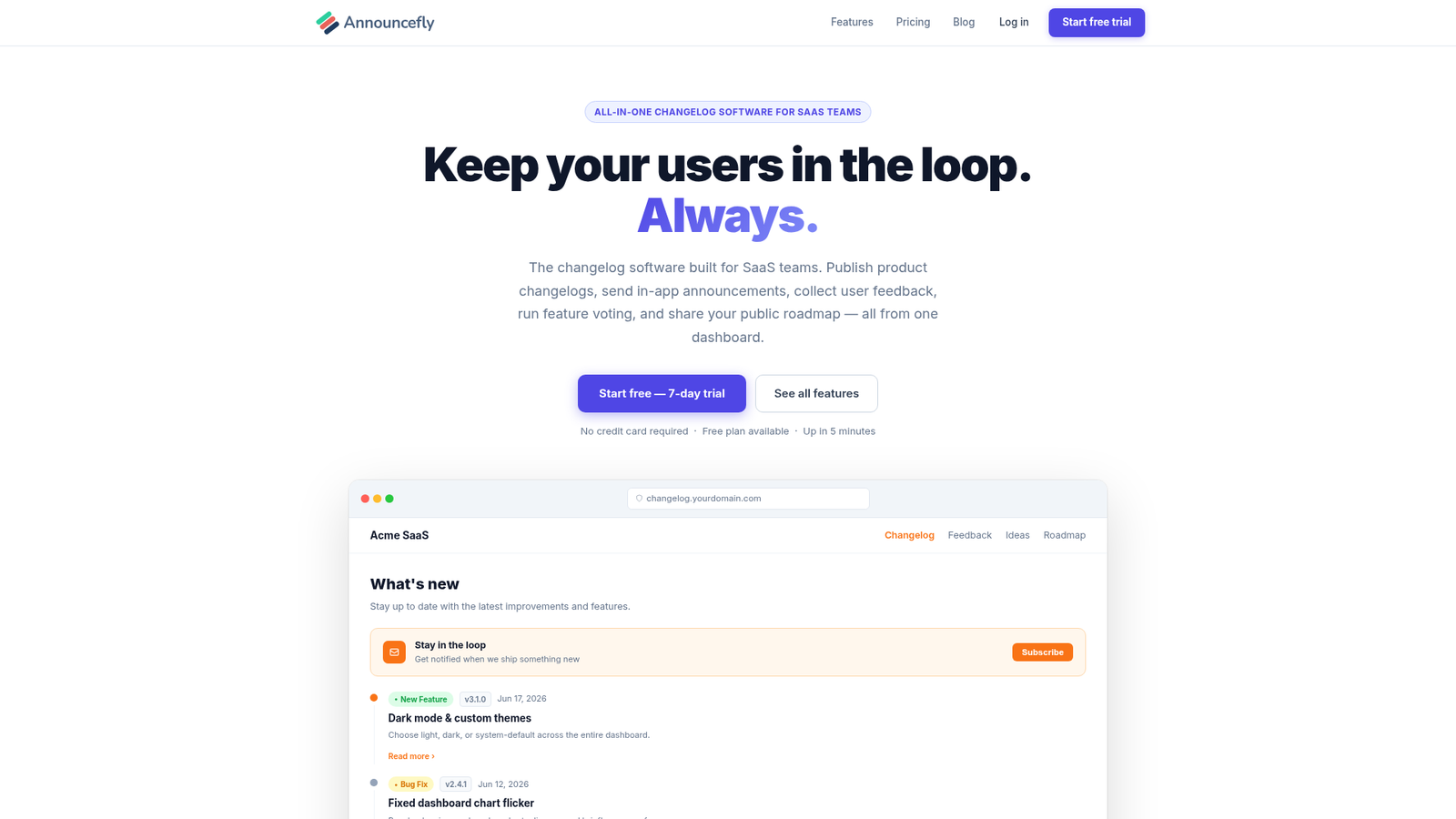
Categorising entries makes your changelog scannable. The most useful categories for SaaS are:
- 🆕 New Feature — net-new functionality
- 🔧 Improvement — something existing that works better
- 🐛 Bug Fix — something broken that is now fixed
- ⚠️ Breaking Change — anything users need to act on
Version numbers help technical users correlate entries with API docs or release notes. AnnounceFly lets you attach a version tag (e.g., v2.4.1) to every entry alongside the category label, so both audiences get what they need.
How Often Should You Publish?
There is no universal answer, but there is a useful rule: publish more often than you think is necessary.
High-growth SaaS teams typically ship to their changelog at least twice a month. Some do it weekly. The worst cadence is monthly-ish — infrequent enough that users forget to check, but too infrequent to build any anticipation.
Whatever cadence you choose, batch small fixes into a single entry rather than publishing five one-line entries on the same day. Substance over frequency.
Email Notifications: The Secret Multiplier
A well-written changelog entry only adds value if people see it. Relying on users to visit a URL is not a strategy — most never will.
The teams that get the most from their changelogs use email notifications. When a user subscribes to your changelog, every new entry lands in their inbox. Open rates on changelog notification emails typically run 40–60% — far above standard marketing email — because subscribers opted in to hear from you.
Common Mistakes to Avoid
Writing in passive voice
"An issue was identified and corrected" → "We fixed a bug that was causing…". Active voice is faster to read and sounds more human.
Bundling too many changes
If your entry covers 12 items, break it into two posts published a week apart. Walls of text get skimmed or skipped entirely.
Skipping bug fixes
Some teams only publish entries for new features. This is a missed opportunity. Fixing a painful bug is exactly the kind of thing users want to know about — it shows you listen and you ship.
Not collecting feedback on the changelog itself
Your changelog is a communication channel, not a broadcast tower. Link users to a feedback board so they can react to updates and request follow-on features. AnnounceFly combines your changelog, feedback board, and public roadmap in one place, so the loop between "we shipped it" and "tell us what you think" is automatic.
How to Build Your Changelog with AnnounceFly
Setting up a professional changelog takes about five minutes in AnnounceFly:
- Create a project — give it your product name and brand colour.
- Write your first entry — use the rich text editor with category labels and version tags.
- Publish — your public changelog page goes live instantly, and any existing subscribers receive an email notification.
- Embed the widget — a single script tag adds an in-app changelog bell to your product. Users see a badge when new entries are published, even without visiting the public page.
You can customise the domain, brand name, colours, and logo at any time. Enterprise teams on the Agency plan can white-label the entire experience.
Key Takeaways
- Write for users, not engineers — plain language, user benefit first.
- Use a consistent 3-part structure: what changed, why it matters, what to do next.
- Publish at least twice a month and stick to the cadence.
- Use email notifications to reach subscribers in their inbox.
- Invite feedback — a changelog without a feedback loop is a missed opportunity.
Ready to ship a changelog your users will actually read?
AnnounceFly gives you a public changelog, email notifications, and an embeddable widget — free for 7 days.
Start your free trial →Frequently Asked Questions
A great changelog entry has three parts: what changed, why it matters to the user, and what they should do next. Include the feature name, a plain-English description, and a CTA or link if relevant. Skip internal ticket numbers, code references, and developer jargon — your users should be the audience, not your engineers.
Most SaaS teams publish weekly or bi-weekly. The key is consistency — users trust a changelog that updates on a predictable cadence far more than one that goes silent for months. Even a minor bug fix or small improvement is worth logging. Silence signals stagnation.
Release notes are typically formal, version-bound documents aimed at technical users. A changelog is more conversational, user-facing, and ongoing — the living history of your product. AnnounceFly publishes your changelog on a public page your users can bookmark and subscribe to via email.
A changelog is retrospective — it records what has already shipped. A roadmap is forward-looking — it shows what you plan to build. Both serve different user needs: the changelog builds trust by showing progress, the roadmap builds excitement by showing direction. Together they form a complete communication loop.
Absolutely. AnnounceFly is designed for product managers, founders, and marketers — not just developers. You write entries in a rich-text editor, and the platform handles the public page, email notifications, and embeddable widget automatically. No code required.
The changelog software your users will actually read
Start your free 7-day trial — no credit card required.
Start Free Trial →